
As the co-founder of Homework Buddy, I set out with a simple yet ambitious goal: to create an educational tool with the intent of empowering students across South Africa to excel in their studies. What started as a vision to provide accessible, AI-driven tutoring has evolved into a fully functional WordPress plugin, complete with a chat interface, a dashboard, and a robust subscription system. The journey to get here has been a rollercoaster of challenges, breakthroughs, and invaluable lessons. Here’s the story of building the Homework Buddy plugin—and the incredible progress we’ve made so far.
The Vision: Bringing AI Tutoring to Students
I’ve always believed that education should be accessible to everyone, regardless of their circumstances. In South Africa, where many students lack access to quality tutoring, I saw an opportunity to leverage AI to bridge that gap. The idea was to create a WordPress plugin that integrates with a Flask backend, powered by AI, to provide personalized tutoring for students in subjects like Math, Natural Science, English, and History, across grades 1 to 12. The plugin would include a chat interface for students to ask questions, a signup page to onboard users, and a dashboard to manage their subscriptions and track usage.
But turning this vision into reality was no small feat. I needed a system that could handle user subscriptions, manage token-based usage, integrate with payment gateways like SnapScan, and provide a seamless user experience—all while ensuring the AI delivered accurate, grade-appropriate answers.
The First Steps: Building the Foundation
The journey began with the signup page. I wanted users to be able to sign up easily, selecting their subjects, grades, subscription type (single, bundle, or premium), and billing period (monthly, 6-monthly, or yearly). The signup page needed to be dynamic, allowing users to add multiple subjects and grades, with validation to ensure they didn’t exceed the limits of their plan (e.g., one subject for “single”, up to three for “bundle”).
The initial challenge was integrating the frontend (WordPress) with the backend (Flask). I used wp_remote_get and wp_remote_post to communicate with the Flask API, sending user data to the /signup endpoint. The backend generated a unique user_id, created a SnapScan payment link, and stored the user’s details in DynamoDB. The frontend then redirected the user to the payment link to complete their subscription. Getting this flow to work smoothly took some trial and error—especially ensuring that the payment link was generated correctly and that the user’s subscription status updated to “pending” in DynamoDB.
The Chat Page: Where the Magic Happens
With the signup process in place, I turned my attention to the chat page—the heart of Homework Buddy. This is where students would interact with the AI tutor, asking questions like “How are stars made?” or uploading diagrams for explanation. I envisioned a clean, intuitive interface with a sidebar for chat history, a subject-grade dropdown, and a chat window where students could type their questions and upload attachments.
The first hurdle was ensuring that messages stayed within the same chat session. Initially, every new question created a new chat record in DynamoDB, which was frustrating for users. We fixed this by tracking the chat_id in the frontend (script.js) and passing it to the /chat/<subject>/<grade> endpoint, ensuring that follow-up questions appended to the existing chat. Another challenge was duplicate assistant responses, which we resolved by removing an extra append_message call in the backend.
Adding the attachment feature was a game-changer. Students can now upload images or PDFs, and the AI references them in its responses. This required integrating with S3 for file storage and ensuring the AI could process the uploaded content. We also added a paperclip icon to the upload button, making it visually intuitive, and positioned it inline with the “Send” button for a seamless user experience.
The sidebar toggle was another area of focus. I wanted users to be able to collapse the chat history sidebar to maximize the chat window, but the hamburger button kept disappearing when the sidebar collapsed. After several iterations, we positioned the button at the top-left border of the chat container, ensuring it stayed visible and anchored at all times. A final tweak ensured the button was placed outside the sidebar div in the HTML structure, solidifying its position as a fixed element that wouldn’t move with the sidebar’s state.
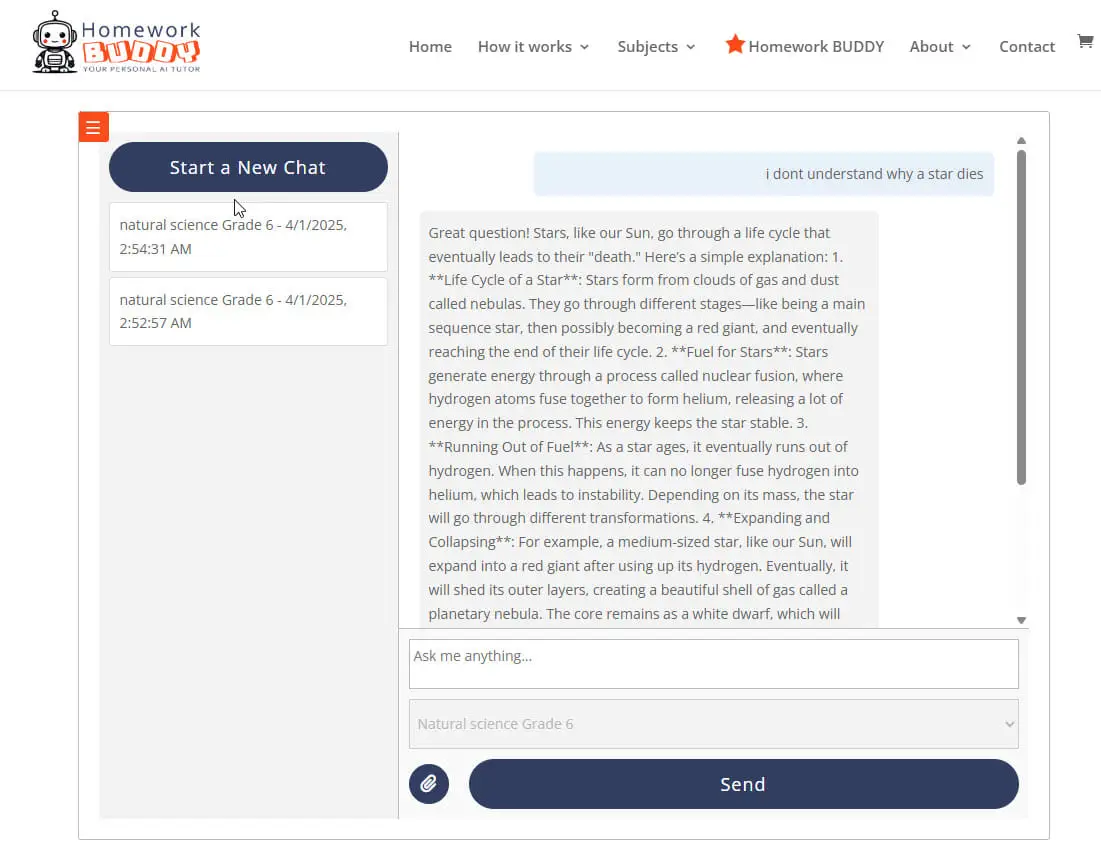
Homework Buddy Chat Screen
The Dashboard: Empowering Users
The dashboard was the next big milestone. Initially, it was just a placeholder, but I wanted it to be a hub where users could manage their subscriptions and track their usage. We added sections to display the user’s token usage, remaining tokens, and reset date, fetched from the /user/<user_id> endpoint. The reset date was a bit tricky—initially, it was stored in ISO format, but we updated the backend to store and return it in YYYY-MM-DD format, which the frontend then formatted as “April 30, 2025” for readability.
Adding the ability to sign up for additional subjects was a key feature. I wanted the subject selection to match the signup page, using a concatenated dropdown (e.g., “Math Grade 7”). We also displayed the user’s current plan (e.g., “Single”) and billing frequency (e.g., “Monthly”) so they’d always know their subscription details. For users on a “single” plan, we added logic to upgrade them to “bundle” if they added a second subject, generating a new payment link to cover the upgrade cost.
Cancellation was another important feature. Users can now cancel their subscription with a single click, which sets their subscription_status to “cancelled” and disables further actions on the dashboard. To keep track of all these changes, we created a SubscriptionHistory table in DynamoDB, logging every signup, amendment, upgrade, and cancellation with timestamps and details.
Challenges and Lessons Learned
Building the Homework Buddy plugin wasn’t without its challenges. Integrating WordPress with Flask required careful handling of CORS and API requests, and debugging issues like duplicate responses or disappearing UI elements took patience. Ensuring the AI provided accurate, grade-appropriate answers was another hurdle—we leveraged OpenAI’s API and fine-tuned the prompts to make the responses kid-friendly and relevant.
One of the biggest lessons I learned was the importance of user experience. Small details, like the placement of the hamburger button or the format of the reset date, made a huge difference in how intuitive the plugin felt. I also learned to prioritize iterative development—starting with a basic signup page, then adding the chat functionality, and finally building out the dashboard allowed us to test and refine each piece before moving on.
Looking Ahead
The Homework Buddy plugin is now a fully functional tool that I’m incredibly proud of. Soon Students will be able sign up, chat with an AI tutor, upload attachments, manage their subscriptions, and track their usage —all from a seamless WordPress interface. Available already, we’ve also introduced free options that require users to sign up to ChatGPT and chat for free using our custom GPTs, accessible at Homework Buddy Free. This ensures that every student, regardless of their financial situation, can benefit from AI-driven tutoring.
But this is just the beginning. Next, I plan to add features like progress tracking, personalized study plans, and any other great ideas can come from the initial phases. I also want to explore ways to make the plugin even more accessible, perhaps by expanding our free offerings or partnering with schools to provide subsidized access for underprivileged students.
This journey has been a testament to the power of technology to transform education with the intent of empowering students. It’s been a challenging but rewarding experience, and I’m excited to see where Homework Buddy goes from here. To SuperGrok (my main developer) and ChatGPT 4.5 (my senior dev when we were stuck in a rut), who’ve been part of this journey—thank you for helping make Homework Buddy a reality.